

Add a venue
A venue is where your event happens. You save each place once and reuse it for every event you run there. On the venue form you also choose how seats are counted, which you can’t change later.
After you create your event, select Click here to add Venue at the bottom of the event page.
Save the place
Section titled “Save the place”The first time you use a place, add it as a new venue.
-
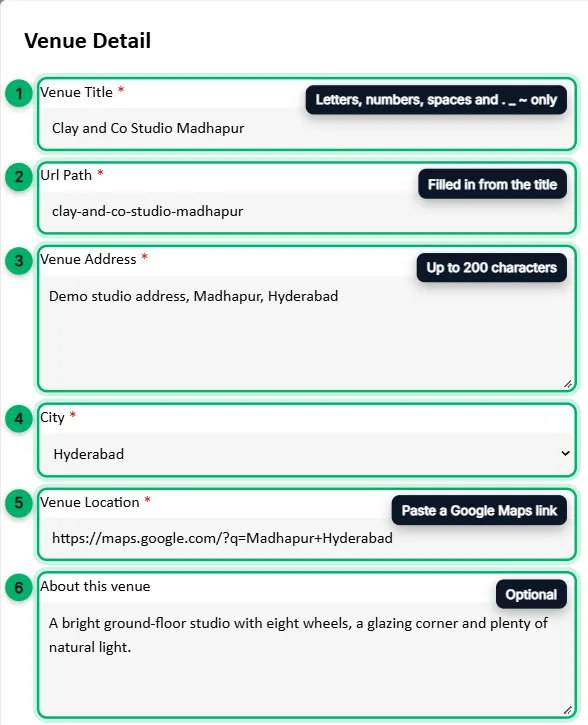
Under Venue, choose Add New Venue. A Venue Detail window opens.
-
Venue Title: the name of the place. Use letters, numbers and spaces, plus
.,_and~. Other symbols such as&or commas aren’t allowed. -
Url Path: filled in from the title. Change it if you like.
-
Venue Address: the full address, up to 200 characters.
-
City: choose the city from the list.
-
Venue Location: open the place in Google Maps, copy the link and paste it here.
-
About this venue (optional): what the place is like, up to 2,000 characters. It’s shown on the venue’s page.
-
Venue Photo (optional): a photo of the place.
-
Select Save.
Next time, pick the place from the Venue list instead. Saved venues are listed by name and city.
Finish the venue
Section titled “Finish the venue”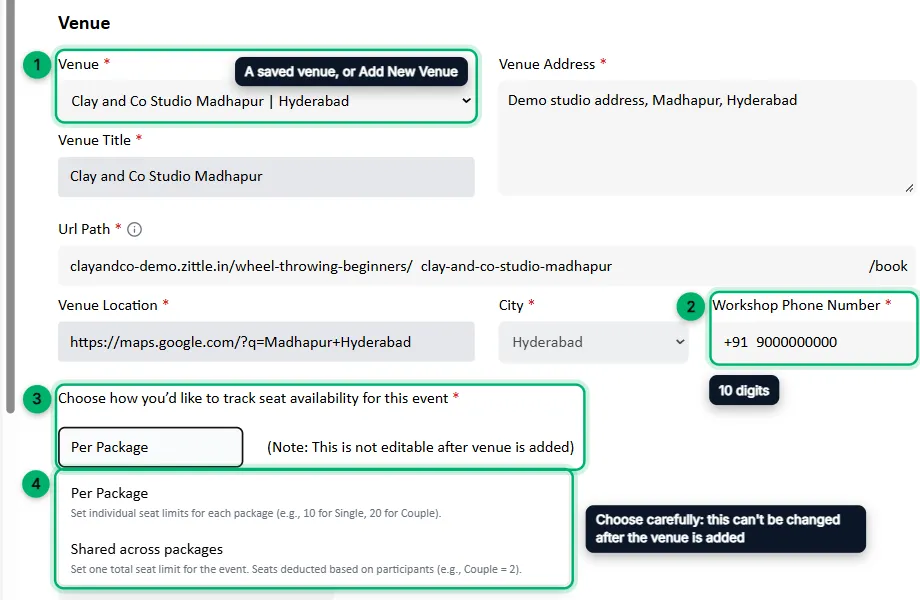
-
Check that your venue is selected under Venue. Its title, address, city and location are filled in for you.
-
Enter the Workshop Phone Number: a 10-digit contact number for this venue.
-
Choose how to track seats:
- Per Package: each ticket package has its own number of tickets. For example, 10 single seats and 5 couple seats.
- Shared across packages: the session has one total number of seats, and each booking uses as many seats as the package’s people. For example, a couple booking uses 2.
-
Add at least one ticket package, then select Save Changes. You’ll see Successfully Added Venue.
Pausing bookings
Section titled “Pausing bookings”After you save the venue, a Pause Booking button appears on it. Use it to stop new bookings at this venue for a while. Select Resume Booking to start taking bookings again.
What’s next
Section titled “What’s next”Add ticket packages to the venue.