

Reviews and customers
How reviews are collected
Section titled “How reviews are collected”After each session, Zittle sends every guest a WhatsApp message asking for feedback, about two hours after the session ends. Guests rate the session and write a review. Each review is linked to their booking, so only real guests can leave one.
Show reviews on your website
Section titled “Show reviews on your website”In your dashboard, go to Reviews & Ratings. Reviews are listed in two groups: Visible Reviews and Hidden Reviews.
New reviews start hidden. To show one on your website, turn on its switch. To take a review off your website again, turn it off.
Your website shows visible reviews on your events, and the average rating of visible reviews on your event cards.
You can filter reviews by event or by rating.
Reply to a review
Section titled “Reply to a review”Select Reply on a review, write your Reply Message, and select Save. Your reply appears with the review.
Your customers
Section titled “Your customers”Customers lists everyone who has booked with you.
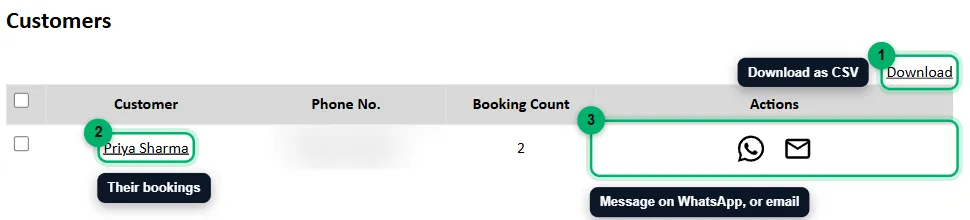
- Download exports your customers as a CSV. Tick the customers you want, or tick none to download everyone.
- Select a name to see all of that guest’s bookings.
- Message the guest on WhatsApp, or email them.
Each customer shows their phone number and how many times they’ve booked. If you collect extra details from guests, such as their city or occupation, under Data to Collect from user in Website Details, those appear here and in the CSV too.