

Add offline tickets
Not every guest books on your website. Someone walks in on the day, a regular calls to reserve a seat, or a friend pays you by UPI. Add these as offline tickets so they appear in your bookings with everyone else, and so the seats come off the count your website shows.
In your dashboard, go to Offline Tickets.
Add the guest and the booking
Section titled “Add the guest and the booking”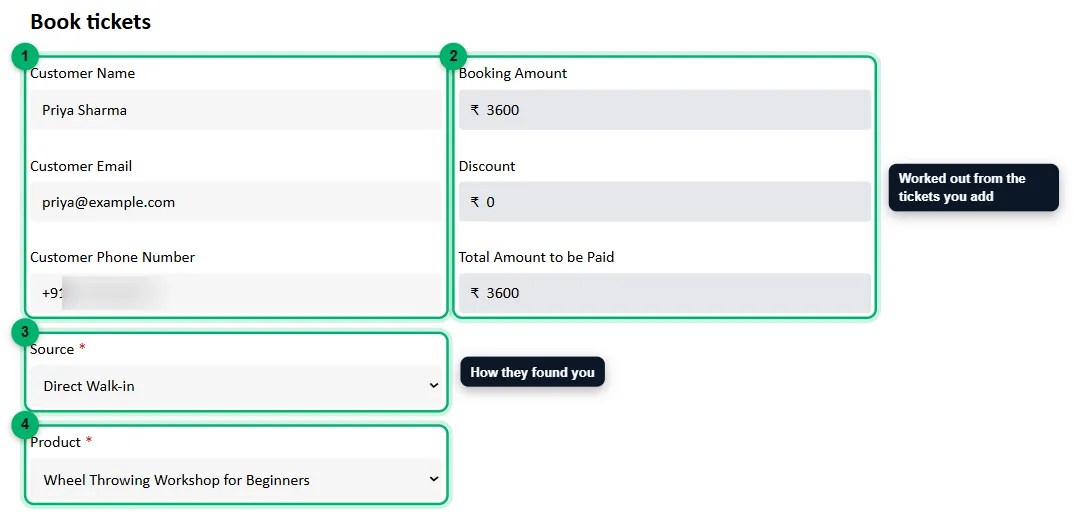
-
Customer Name, Customer Email and Customer Phone Number: the guest’s details. The phone number is an Indian mobile number.
-
Booking Amount, Discount and Total Amount to be Paid: these fill in on their own from the tickets you add below, including any package discount.
-
Source: how the guest found you: Website, Google Maps, Marketplace, Google/Insta Ads, Direct Walk-in or Referrals.
-
Product: the event. Only events with upcoming dates are listed.
Choose the date and tickets
Section titled “Choose the date and tickets”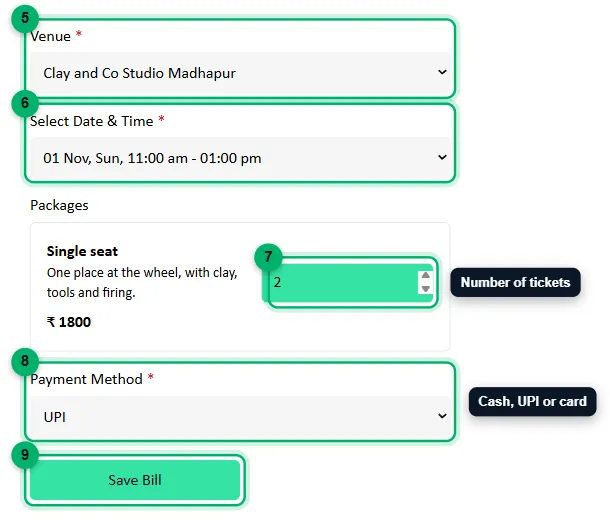
-
Venue: where the guest is booked.
-
Select Date & Time: the session.
-
Packages: enter how many of each package the guest is buying.
-
Payment Method: how they paid you: Cash, UPI or Card.
-
Select Save Bill. The new booking opens.
What happens next
Section titled “What happens next”- The tickets come off the session’s available seats, just like an online booking.
- The guest gets the same booking confirmation on WhatsApp and by email as an online guest, and the WhatsApp reminder before the session.
- The booking appears under Bookings, with the payment method and source you chose. See Manage bookings.