

Add your business details
Your business details tell Zittle who you are and where to reach you. They also set your free web address, such as yourstudio.zittle.in. This is the first step of the Getting started checklist.
-
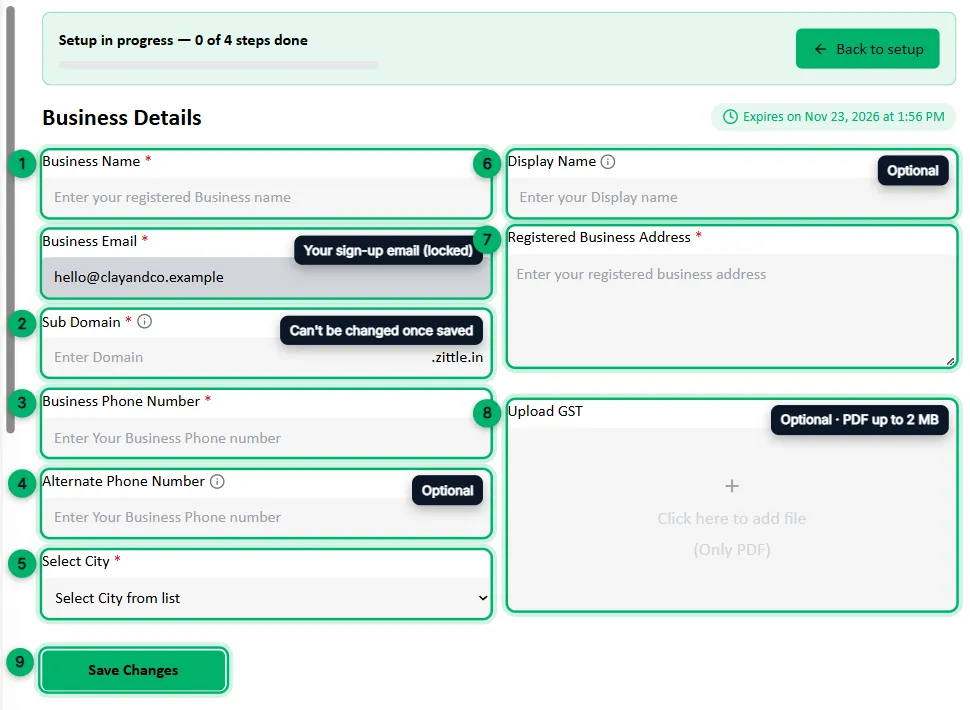
In your dashboard, go to Business Details, or select Set up next to step 1 of the Getting started checklist.
-
Enter your Business Name: your registered business name.
The Business Email is the address you signed up with. You can’t change it here.
-
Choose your Sub Domain. This becomes your free web address: if you enter
claystudio, your site isclaystudio.zittle.in. Use small letters, numbers and hyphens only. -
Enter your Business Phone Number: 10 digits, with no spaces or symbols.
-
Optionally, add an Alternate Phone Number that customers or the Zittle team can use if your main number isn’t reachable. It must be different from your main number.
-
Choose your City from the list.
-
Optionally, add a Display Name. This is the name customers see on your website. If you leave it blank, your business name is used.
-
Enter your Registered Business Address.
-
Optionally, upload your GST certificate as a PDF of up to 2 MB.
-
Select Save Changes. You’ll see Successfully saved Business Details.
What’s next
Section titled “What’s next”Set up your website: add your logo, colours and the content for your booking site.