

Reuse saved packages
Most organisers sell the same few tickets everywhere: a Single seat, a Couple, maybe a Group of 4. Instead of typing these out on every venue, you save each one once and pick it whenever you add packages to a venue.
In your dashboard, go to Packages to see every package you’ve saved.
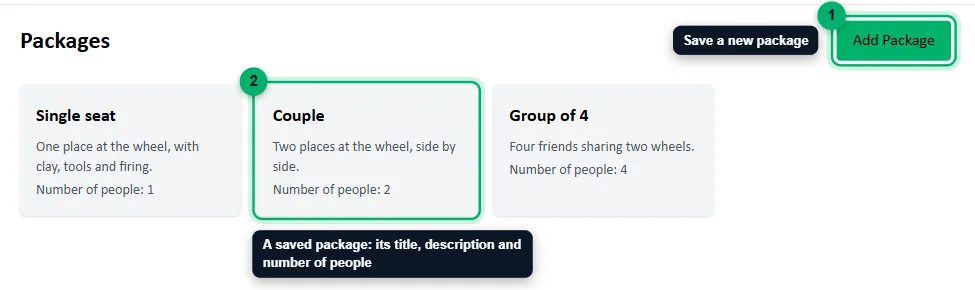
- Add Package: save a new package.
- A saved package, with its title, description and Number of people.
What a saved package holds
Section titled “What a saved package holds”A saved package holds only what’s the same everywhere you use it:
- Package Title, such as Single seat.
- Description (optional), such as One place at the wheel, with clay, tools and firing.
- Number of People Allowed: how many people one booking covers, 1 or more. On venues that count seats Shared across packages, a booking uses this many seats. See Add a venue.
Prices, discounts, deposits and ticket numbers aren’t part of it. You set those on each venue when you add the package, so the same Couple package can cost more on a weekend at one studio than on a weekday at another.
Save a package
Section titled “Save a package”- On the Packages page, select Add Package. A Package Detail window opens.
- Enter the Package Title, an optional Description and the Number of People Allowed.
- Select Save Package.
You can also save a package while adding one to a venue, by choosing Add New Package. It’s saved to this same list. See Add ticket packages.
Use it on a venue
Section titled “Use it on a venue”When you add a package to a venue, choose the saved package from the Package list, then set that venue’s price, discount, payment type and tickets. The steps are in Add ticket packages.
Why it matters for bulk changes
Section titled “Why it matters for bulk changes”The Bulk Editor finds a package across your venues by the saved package it was picked from. If every venue’s Couple comes from the same saved package, one run can raise the Couple price everywhere. A package that wasn’t picked from your saved packages can’t be matched, and the editor says how many were left out. See Change dates and prices in bulk.
So keep one saved package per kind of ticket, and pick it every time, rather than saving a new Single seat for each venue.